
2026年11月13日

This article is a localized edition of the Japanese original. Read the Japanese original
When you cannot connect to port 8443, it is one of two things: it is blocked on the visitor's side (an office network or proxy), or the server is not listening on 8443 or its firewall has it closed. If the result changes when you try from another connection (such as a smartphone hotspot), it is the former; if it fails from everywhere, it is the latter. Logging in to the server and checking ss -tlnp and curl -vk tells them apart in a few minutes.
Here is the short version.
- 8443 is registered with IANA as pcsync-https, but in practice it is widely used as an alternate HTTPS port. Tomcat's TLS connector, admin consoles of various devices, and reverse-proxy admin screens often use it by default.
- Company and school networks sometimes block outbound traffic on anything other than 80 and 443. On those networks, 8443 will not connect "even when the server is fine."
- On the server side, two things decide it: whether a process is listening on 8443 (
ss), and whether the OS firewall (ufw / firewalld) and the cloud security group allow 8443. - The detailed steps for opening the port are in a separate article, "How to open port 8443." This article is about finding where the connection stops.
What is port 8443?
Port 8443 is TCP port 8443, conventionally used to serve HTTPS instead when the standard HTTPS port 443 cannot be used or you do not want to use it. Ports below 1024 require administrator privileges, so application servers running as a regular user typically pick 8443 when they handle TLS (8080 is the HTTP alternative and 8443 is the HTTPS alternative).
| Example use | Why it uses 8443 by default |
|---|---|
| Apache Tomcat HTTPS connector | The configuration examples use 8443 (the TLS counterpart of 8080) |
| Admin consoles of network devices, NAS, UPS and so on | To keep 443 free for other services |
| Admin screens of reverse proxies and container platforms | To separate the public site (443) from administration (8443) |
| Development and staging environments | To run alongside production on 443 |
To open it in a browser, put the port number in the URL, as in https://example.com:8443/. Unlike 443, you cannot omit it.
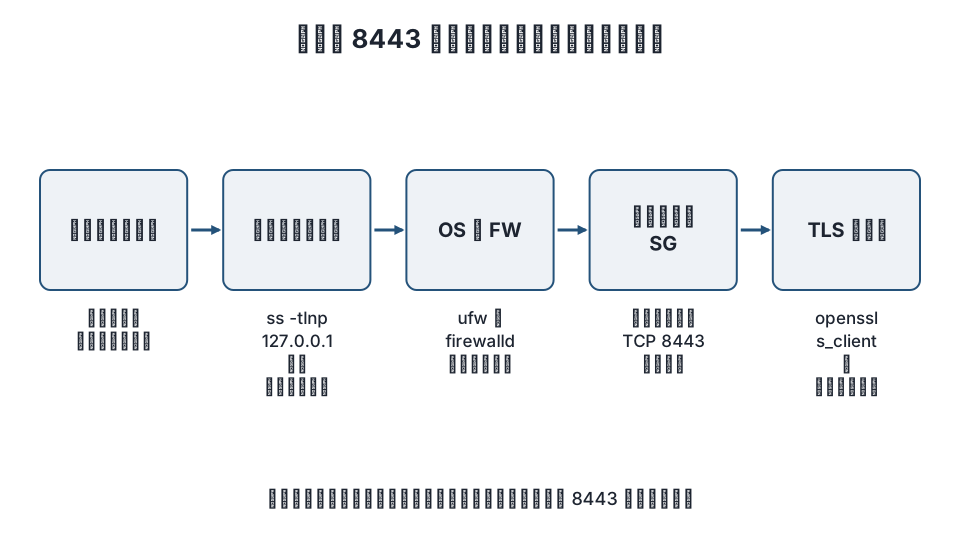
Overview of the troubleshooting steps
| Step | What to check | Command | What the result means |
|---|---|---|---|
| 1 | Does it connect from another network? | Browser, curl |
If it connects, the problem is the visitor's network |
| 2 | Is the server listening on 8443? | ss -tlnp |
If it is not listed, it is the application's configuration |
| 3 | OS firewall | ufw status / firewall-cmd --list-all |
If 8443/tcp is missing, it is closed |
| 4 | Cloud security group | Each cloud's management console | If 8443 is missing from inbound rules, it is closed |
| 5 | TLS response | openssl s_client, curl -vk |
Finds certificate or protocol mismatches |
Step 1: Determine whether it is blocked on the visitor’s side
First, before touching the server, try from a different source.
- Open the same URL from another network, such as a smartphone hotspot or your home connection.
- If there is a device that does not go through the office proxy, try from it too.
If it connects from another network, the server is fine and the original network (firewall, proxy, filtering) is blocking 8443. Nothing on the server side can fix this; the solution is to ask the network administrator to allow it, or to change the setup so the service is offered on 443.
In Windows PowerShell, you can check just TCP reachability from the visitor's machine.
Test-NetConnection example.com -Port 8443If you see TcpTestSucceeded : False, the TCP connection itself is not getting through from that machine. On Linux / macOS, nc (netcat) does the same thing.
nc -zv example.com 8443Step 2: Is the server listening on 8443?
SSH into the server and list the TCP ports it is listening on.
sudo ss -tlnp | grep 8443If nothing appears, the application is not running on 8443. Check the application's logs and configuration (the Connector in server.xml for Tomcat, the listen line for Nginx).
If it does appear, look at which address it is listening on.
| Shown as | Meaning |
|---|---|
0.0.0.0:8443 or *:8443 |
Listening on all addresses (reachable from outside) |
[::]:8443 |
All IPv6 addresses (in many environments it also accepts IPv4) |
127.0.0.1:8443 |
Loopback only. Not reachable from outside |
For 127.0.0.1:8443, change the application's bind address setting, or put a reverse proxy in front that accepts connections on 443.
Also check a connection from the server itself.
curl -vk https://127.0.0.1:8443/ --connect-timeout 5If you get a response here, the application is running and the remaining cause is the firewall or the network.
Step 3: Check the OS firewall
Show the current rules with ufw on Ubuntu / Debian, or firewalld on the RHEL family (AlmaLinux / Rocky Linux).
# ufw
sudo ufw status verbose

# firewalld
sudo firewall-cmd --list-all
If 8443/tcp is not in the list, it is closed. In environments that use nftables directly, check with sudo nft list ruleset. To add an allow rule, see "How to open port 8443."
Step 4: Check the cloud security group
On VPS and cloud platforms, there is another layer of control outside the OS firewall. Even if you open the port in the OS, traffic will not arrive if this layer is closed.
| Service | Where to check |
|---|---|
| AWS EC2 / Lightsail | Inbound rules of the security group (for Lightsail, the firewall under Networking) |
| Azure | Inbound security rules of the network security group (NSG) |
| Google Cloud | VPC firewall rules (ingress, target tags) |
| Japanese VPS services | The packet filter in the control panel |
In every case, check that there is an inbound rule for "TCP 8443, source 0.0.0.0/0 (or the IPs you want to allow)."
Step 5: Check the TLS response
If TCP connects but the browser shows an error, the problem is at the TLS layer.
openssl s_client -connect example.com:8443 -servername example.com </dev/null 2>/dev/null | head -20- If you see anything other than
Verify return code: 0 (ok), the certificate is expired, does not match the hostname, is self-signed, or similar. With admin consoles, accepting the browser warning for a self-signed certificate is common practice, but for a public service, install a proper certificate. - An error like
wrong version numberappears when plain HTTP is running on 8443 but you open it withhttps://. Conversely, if you openhttp://example.com:8443/and get what looks like garbled output, TLS is running but you opened it withhttp://.
The WordPress angle
A public WordPress site is normally served on 443, and 8443 is used only in cases like these:
- The server's control panel serves its admin screen on 8443 (the Plesk admin panel is a typical example).
- A development or staging WordPress runs on the same server as production as
https://example.com:8443/. - The "raw" listener of a WordPress install behind a reverse proxy is on 8443.
In that last setup, set WordPress's "Site Address (URL)" to the 443 URL that visitors use (https://example.com), and have the proxy pass X-Forwarded-Proto so WordPress detects HTTPS. If you make 8443 the site address directly, the whole site breaks with redirects when you close the port. If you get locked out of the admin screen, also see "How to fix a white screen in the admin area only."
FAQ
Is port 8443 dangerous?
The port number itself is not dangerous. The question is whether the service running on it (an admin console, for example) should be exposed to the outside. For admin use, restrict source IPs or limit access to a VPN, and close it if it does not need to be public.
8443 does not connect from the office but works from home
The office network's exit point (firewall or proxy) is blocking everything except 80 and 443. You cannot fix this on the server, so ask the network administrator to allow 8443, or change the setup to serve the service on 443.
8443 is LISTEN on the server, but it does not connect from outside
Check these three in order: it is listening on 127.0.0.1:8443 (not for external access), the OS firewall is closed, or the cloud security group is closed. The first is fixed in the application's settings; the second and third by adding allow rules.
Can I serve the same service on both 8443 and 443?
Yes. Write listen for both in Nginx or Apache, or have a reverse proxy on 443 forward to the application on 8443. The easiest arrangement is to give visitors the 443 URL and keep 8443 for internal use.
Summary
- 8443 is the alternate HTTPS port, often used by default by admin consoles and application servers.
- When it does not connect, try another network to decide whether it is the visitor's side or the server's side; on the server side, check
ss -tlnp→ the OS firewall → the cloud security group → the TLS response, in that order. - Serving public services on 443 and keeping 8443 for internal or admin use avoids the problem of blocking on the visitor's side.
Related articles
- How to open port 8443: ufw, firewalld, cloud security groups, and Nginx / Apache settings
- Causes and fixes when port 8080 is blocked and will not connect
- How to install Nginx and initial setup
- The complete guide to setting up Cloudflare for WordPress
References: IANA Service Name and Transport Protocol Port Number Registry, ss(8) – iproute2, Test-NetConnection – Microsoft Learn
Revision history: 2026-11-09 full revision (replaced the boilerplate steps with troubleshooting steps that separate the visitor's side from the server's side, and added the uses of 8443 and how it is used with WordPress). This article is published by WordPress Hakase (Lightscend Co., Ltd.).
Questions about WordPress? The publisher of this site is based in Japan and replies in Japanese. Contact (Japanese)