

This article is a localized edition of the Japanese original. Read the Japanese original
In one sentence, the difference between Apache and Nginx is this: Apache is a web server you can control in fine detail with per-directory .htaccess files and extend with modules, while Nginx is a web server that handles many connections with few processes and keeps its configuration in one place. Both run WordPress without problems, and combining the two on the same server is also a common setup.
Here is the conclusion up front.
- If you are on shared hosting, or want to use plugins that rewrite
.htaccess(some security and caching plugins), Apache is easier to work with. - If you configure your own VPS and want lighter handling of many simultaneous connections and static files, Nginx is a good fit.
- If you run PHP through PHP-FPM on both, WordPress itself is not much faster on either one. The differences show up in static file delivery and in memory use as connections grow.
- If you cannot decide, you can also use both: a reverse proxy setup with Nginx in front and Apache behind it.
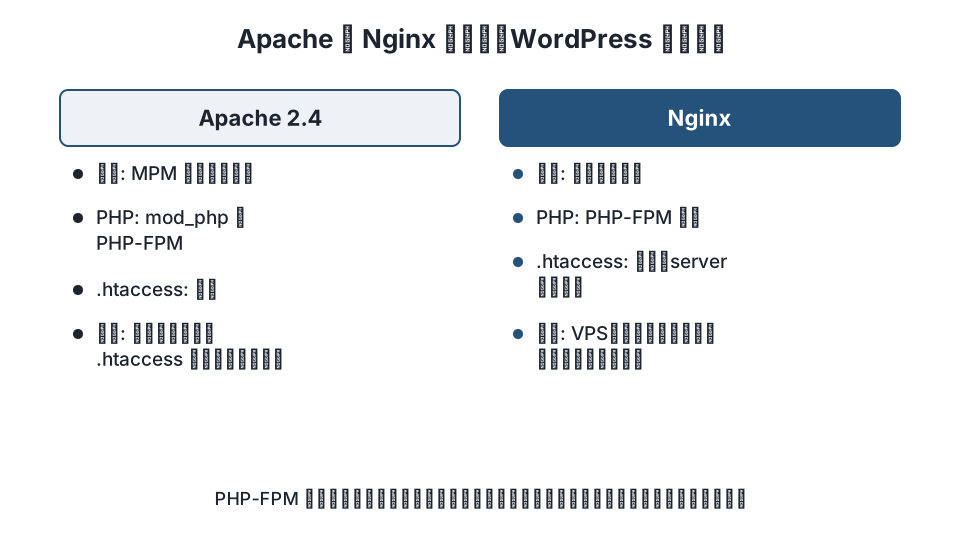
1. Connection handling: MPMs vs event-driven
Apache switches how it handles connections through MPMs (Multi-Processing Modules) (Apache MPM). prefork uses one process per connection, worker uses one thread per connection, and event hands idle (keep-alive) connections to a dedicated thread so the worker threads are freed. The default in 2.4 is event, but using mod_php (covered below) ties you to prefork.
Nginx is event-driven from the ground up: a small number of worker processes each handle many connections asynchronously (How Nginx works). It does not add processes or threads as connections grow, so memory stays relatively flat even when many connections are waiting.
| Aspect | Apache (2.4) | Nginx |
|---|---|---|
| Connection handling | Chosen by MPM (prefork / worker / event) | Event-driven (worker processes × many connections) |
| When concurrent connections grow | prefork adds processes, so memory grows too. event keeps this down | The number of workers is fixed and memory per connection is small |
| Key settings | MaxRequestWorkers, ServerLimit (setting the connection limit) |
worker_processes, worker_connections |
2. How PHP runs: mod_php vs PHP-FPM
This is the part that matters most for WordPress speed.
- mod_php (Apache): PHP is embedded in the Apache processes. It is simple to set up and lets you use
php_valuein.htaccess, but it requires thepreforkMPM, and even processes that only return static files such as images carry PHP, so memory use is high. - PHP-FPM (Apache or Nginx): PHP runs as a separate pool of processes, and the web server passes requests to it over FastCGI. Apache connects with
mod_proxy_fcgi, Nginx withfastcgi_pass. The web server returns static files cheaply, and PHP execution is managed in the PHP-FPM pool.
Nginx has no equivalent of mod_php, so PHP-FPM is the only option with Nginx. If Apache also uses PHP-FPM, it can run the event MPM, and PHP execution is on equal footing with Nginx. The switch is described in how to connect Apache to PHP-FPM.
3. .htaccess or not
When AllowOverride is enabled, Apache lets per-directory .htaccess files override the configuration. That is why WordPress permalinks, access restrictions from security plugins and compression settings from caching plugins get written to .htaccess. The upside is that you can change settings without being the server administrator; the downside is extra work on every request, because Apache looks for and reads .htaccess files (the Apache .htaccess tutorial also recommends not using .htaccess when you can edit the main server configuration).
Nginx has no .htaccess. All settings go in nginx.conf and server blocks, and changes require nginx -s reload. WordPress permalinks are handled with try_files $uri $uri/ /index.php?$args;. Plugins that write settings to .htaccess have no effect on Nginx, so you have to move whatever a plugin's documentation lists as "for Nginx, configure manually" into your server block yourself.
4. How configuration works
| Aspect | Apache | Nginx |
|---|---|---|
| Where configuration lives | httpd.conf / apache2.conf + sites-enabled + .htaccess |
nginx.conf + conf.d / sites-enabled. No .htaccess |
| Configuration units | <Directory>, <Location>, <VirtualHost> |
server, location (with a precedence order between regex and prefix matches) |
| Applying changes | .htaccess takes effect immediately. The main configuration needs a reload |
reload |
| Adding features | Many modules, enabled with a2enmod |
Standard modules and dynamic modules. Some require a build |
| Checking for config errors | apachectl configtest |
nginx -t |
In Nginx, which location wins is decided by the type of match (exact, prefix, regex), not by the order you write them in. The combination of location ~ \.php$ and location ~* \.(jpg|css|js)$ in WordPress setups is a common stumbling point; how to run WordPress on Nginx walks through it step by step.
5. Which to use for WordPress
| Setup | Suitable web server | Why |
|---|---|---|
| Shared hosting (you cannot choose the web server) | Go with the host's default (often Apache or LiteSpeed) | Many plugins and guides assume you can configure things in .htaccess |
| One to a few sites on a VPS, managed by you | Nginx + PHP-FPM, or Apache (event) + PHP-FPM | Either works; pick the one you know. Choose Apache if you use plugins that depend on .htaccess |
| Heavy traffic, many static files, many concurrent connections | Nginx + PHP-FPM | Small memory per connection and lightweight static delivery |
| You want to lighten the front without changing the existing Apache | Nginx (front) + Apache (back) | Nginx handles static files and SSL; Apache handles the existing configuration, including .htaccess |
| Many admin users and frequent configuration changes | Apache | Easy to separate settings per directory |
"Which is faster" depends, once PHP-FPM is used on both, on the amount of static files, the number of concurrent connections and whether caching is in place. Published benchmarks use different conditions, so this article does not quote numbers. If you want to compare on your own site, run the same WordPress on the same server with each one and use ab or wrk to watch response times and memory use while varying the number of concurrent connections.
How to decide
- Can you choose the web server yourself? If not, there is nothing to compare; follow your host's setup.
- Do you use plugins or guides that depend on
.htaccess? If so, Apache. - Are concurrent connections and static file delivery a problem? If so, Nginx, or a setup with Nginx in front.
- Use PHP-FPM on both. If you compare an Apache still running mod_php with Nginx, most of the difference comes from mod_php.
FAQ
Which is faster, Apache or Nginx?
If PHP runs through PHP-FPM on both, page generation speed for WordPress is not very different. Nginx's design has the advantage for static file delivery and memory use under many concurrent connections. Numbers vary with conditions, so measure in your own environment.
Can I use .htaccess with Nginx?
No. Nginx has no .htaccess mechanism, and all settings go in server blocks. If you use plugins that write settings to .htaccess, move the same settings into your Nginx configuration by hand.
Do WordPress settings change if I move from Apache to Nginx?
WordPress's own settings do not change. What changes is the web server side: permalinks (try_files), the connection to PHP (fastcgi_pass), the upload limit (client_max_body_size), access restrictions and so on. Most of the work is rewriting what was in .htaccess in Nginx syntax.
Is there any point in using Apache and Nginx together?
Yes. Put Nginx in front as a reverse proxy to handle SSL termination and static files, and keep running your existing configuration, including .htaccess, on Apache behind it. You lighten the front without breaking the existing Apache configuration.
Summary
- The design difference: Apache is flexible through
.htaccessand modules, while Nginx handles many connections lightly with few processes. - Speed differences for WordPress come mainly from how PHP runs (mod_php or PHP-FPM), so switch both to PHP-FPM before comparing.
- Where you cannot choose, follow your host's default; where you can, decide based on whether you depend on
.htaccessand how many concurrent connections you get.
Related articles
- How to run WordPress on Nginx (PHP-FPM, permalinks, FastCGI cache)
- How to connect Apache to PHP-FPM: mod_proxy_fcgi configuration and checking 503 errors
- How to set Apache's concurrent connection limit: MaxRequestWorkers, ServerLimit, ListenBacklog
References: Apache HTTP Server 2.4 – MPM, Apache – .htaccess tutorial, Nginx documentation, WordPress – Nginx
Update history: 2026-11-09 full revision (rewritten from an installation guide into an article comparing how the two work and when to use each for WordPress). This article is published by WordPress Hakase (Lightscend Inc.).
Questions about WordPress? The publisher of this site is based in Japan and replies in Japanese. Contact (Japanese)