
2026年11月12日

This article is a localized edition of the Japanese original. Read the Japanese original
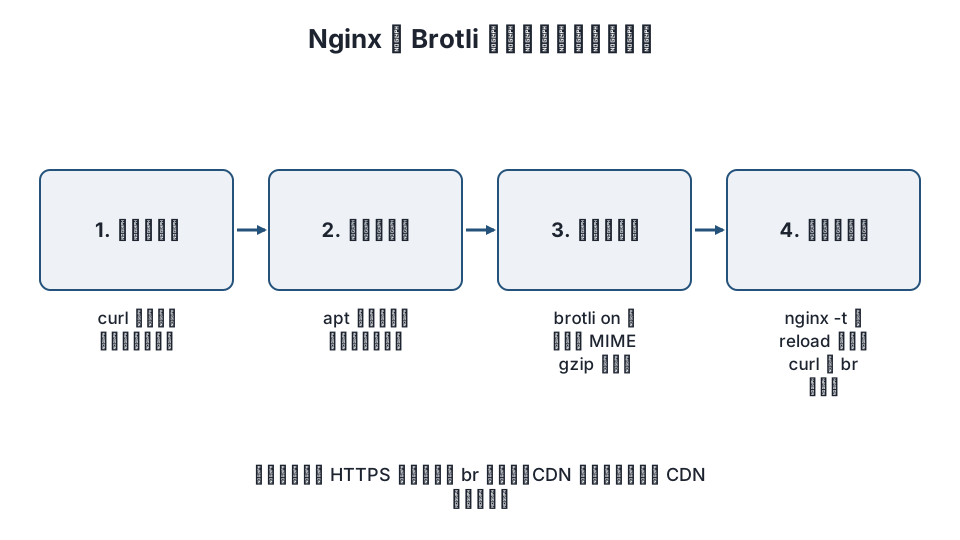
To enable Brotli compression in Nginx, load the ngx_brotli module into Nginx, set brotli on; plus the MIME types to compress, and reload: three stages in total. Nginx itself does not include Brotli support, so installing the module is most of the work.
Here is the short version.
- Brotli compresses smaller than gzip, and major browsers send
Accept-Encoding: bronly for HTTPS pages. On a site still served over HTTP, enabling it has no effect. - Depending on your environment, you either install the module with
apton Debian / Ubuntu, or build it yourself from the source of the same Nginx version (as of November 2026, the official nginx.org packages do not include it). - Keep gzip enabled alongside it. Clients that do not support Brotli get gzip.
- On WordPress, where you configure things depends on whether a caching plugin writes static HTML and whether you use a CDN such as Cloudflare.
What is Brotli?
Brotli is a lossless compression format published by Google. On the web it is used to transfer text files (HTML, CSS, JavaScript, SVG, JSON and so on) at a smaller size than gzip. In HTTP response headers it appears as Content-Encoding: br. Compression levels run from 0 to 11; higher levels produce smaller output but cost more CPU time. Already-compressed files such as images, video and zip archives gain nothing, so leave them out.
The Nginx implementation is google/ngx_brotli, which consists of two modules.
| Module | Role | Main directives |
|---|---|---|
| ngx_http_brotli_filter_module | Compresses responses on the fly | brotli, brotli_comp_level, brotli_types, brotli_min_length |
| ngx_http_brotli_static_module | Serves pre-built .br files as is |
brotli_static |
Step 1: Check the current state
Before you start, see what the server returns now. Tell an HTTPS URL that you accept br and check content-encoding.
curl -sI -H "Accept-Encoding: br, gzip" https://example.com/ | grep -i -E "content-encoding|server"If you see content-encoding: gzip, only gzip is active; if nothing appears, responses are not compressed. Also check the Nginx version and the modules already loaded.
nginx -v
nginx -V 2>&1 | tr ' ' '\n' | grep -i brotli
ls /etc/nginx/modules-enabled/ 2>/dev/null
If brotli does not appear in the nginx -V output, start by installing the module.
Step 2: Install ngx_brotli
From distribution packages (Debian / Ubuntu)
For the Debian / Ubuntu Nginx (the nginx package installed with apt), some releases ship the Brotli modules as packages. Search first.
apt search brotli 2>/dev/null | grep -i nginxIf you find libnginx-mod-http-brotli-filter and libnginx-mod-http-brotli-static (names may differ between releases), installing them is enough: the load configuration is placed in /etc/nginx/modules-enabled/.
sudo apt install libnginx-mod-http-brotli-filter libnginx-mod-http-brotli-static
nginx -t && sudo systemctl reload nginx
If they are not available, or if you installed Nginx from the official nginx.org repository, build from source as described next.
Building from source
A dynamic module must be built from the source of exactly the same version as the Nginx you are running. If the versions differ, Nginx fails to start with "module is not binary compatible" when loading it.
# 1. Note the running Nginx version and its configure arguments
nginx -v
nginx -V

# 2. Get the source of the same version and ngx_brotli
cd /usr/local/src
curl -LO https://nginx.org/download/nginx-1.26.3.tar.gz   # match the version to nginx -v
tar xzf nginx-1.26.3.tar.gz
git clone --recurse-submodules -j8 https://github.com/google/ngx_brotli

# 3. Build as a dynamic module (add --add-dynamic-module to the nginx -V arguments)
cd nginx-1.26.3
./configure --with-compat --add-dynamic-module=../ngx_brotli
make modules

# 4. Copy the resulting .so files to the Nginx modules directory
sudo cp objs/ngx_http_brotli_filter_module.so objs/ngx_http_brotli_static_module.so /etc/nginx/modules/
The build needs packages such as build-essential, cmake, libpcre2-dev, zlib1g-dev and libssl-dev. For details and the latest notes, see the ngx_brotli README.
Loading the modules
If you built the modules, load them at the top of nginx.conf (before the events block). If you installed packages, this configuration is added automatically and you can skip it.
load_module modules/ngx_http_brotli_filter_module.so;
load_module modules/ngx_http_brotli_static_module.so;
Step 3: Write the compression settings
Put these in the http block or in the target server block. You can leave your gzip settings as they are.
# Brotli (for browsers that support it)
brotli            on;
brotli_comp_level 6;
brotli_static     on;
brotli_min_length 1000;
brotli_types
    text/plain text/css text/xml text/javascript
    application/javascript application/x-javascript application/json
    application/xml application/rss+xml application/atom+xml
    image/svg+xml font/ttf font/otf application/vnd.ms-fontobject;

# gzip (for clients without Brotli support; keep existing settings if you have them)
gzip         on;
gzip_vary    on;
gzip_types   text/plain text/css text/xml text/javascript application/javascript application/json application/xml image/svg+xml;
Each directive means the following.
| Directive | Meaning | Guideline |
|---|---|---|
brotli on |
Compresses responses with Brotli on the fly | — |
brotli_comp_level |
Compression level 0–11 | 4–6 for on-the-fly compression. 11 suits pre-compressing static files |
brotli_types |
MIME types to compress (text/html is always included, even if not listed) |
Do not include images, video or PDF |
brotli_min_length |
Responses shorter than this length (bytes) are not compressed | Very small responses do not shrink |
brotli_static |
Serves a pre-compressed file such as index.html.br if it exists |
on. always serves it without checking Accept-Encoding, so it is not normally used |
When both Brotli and gzip are enabled, clients that send Accept-Encoding: br get Brotli and clients that only accept gzip get gzip. There is no need to turn gzip off.
Step 4: Reload and verify
sudo nginx -t
sudo systemctl reload nginx

# Check while advertising Brotli support
curl -sI -H "Accept-Encoding: br" https://example.com/ | grep -i content-encoding
# → content-encoding: br

# Check a gzip-only client
curl -sI -H "Accept-Encoding: gzip" https://example.com/ | grep -i content-encoding
# → content-encoding: gzip

# Check that static files such as CSS are covered too
curl -sI -H "Accept-Encoding: br" https://example.com/wp-includes/css/dist/block-library/style.min.css | grep -i -E "content-encoding|content-type"
In a browser, open the "Network" tab of the developer tools and look at the content-encoding response header. If it is not br, check the following in order.
- Is the URL HTTPS? (Over HTTP, major browsers do not send
br. Ifcurlgetsbrbut the browser getsgzip, this is the reason.) - Does the module appear in
nginx -V, and isload_moduleplaced beforeevents? - Is the response's
Content-Typelisted inbrotli_types? (Everything other thantext/htmlmust be listed.) - Is the response smaller than
brotli_min_length? - Is there a CDN or reverse proxy in front that decides the compression? (See the next section.)
Notes for WordPress
Static files written by caching plugins
If you use a plugin such as WP Super Cache or W3 Total Cache that saves pages as static HTML files, those files are served by Nginx, not PHP. With brotli on in effect, these static files are compressed on the fly as well. If the plugin's "gzip compression" option creates .gz files, it is set up to work with Nginx's gzip_static; to switch to Brotli you would need to create separate .br files for brotli_static. Whether .br files can be generated automatically depends on the plugin, so it is simpler not to force pre-compression and run with on-the-fly compression via brotli on only.
Theme and plugin JavaScript and CSS
CSS and JavaScript under wp-content and wp-includes are covered if brotli_types includes text/css and application/javascript. If your theme generates .br files at build time, brotli_static on serves those files.
When you use a CDN such as Cloudflare
Compression between visitors and the CDN is decided by the CDN's settings. With Cloudflare, Brotli compression for visitors is switched in the Cloudflare dashboard (under Speed). The Nginx settings apply to traffic between Cloudflare and your origin server. So even if the browser gets br on a site behind Cloudflare, that does not mean your Nginx settings are working. To check the origin, connect without going through Cloudflare (curl --resolve example.com:443:オリジンのIP ..., replacing the placeholder with your origin IP).
Measuring the effect
Judge the effect by transfer size (the transferred size in the "Size" column of the developer tools). To measure the impact on page speed, check whether the PageSpeed Insights "Enable text compression" finding disappears, and how LCP changes. Basic settings to speed up WordPress walks through reviewing things in order, starting with measurement.
Frequently asked questions
Should I use Brotli or gzip in Nginx?
Enable both. Clients that support Brotli (major browsers over HTTPS) get Brotli, and everything else gets gzip. If you turn gzip off, older environments and some tools receive uncompressed responses.
What should brotli_comp_level be?
For pages compressed on the fly, 4–6 is common. Level 11 takes a long time to compress, so it suits creating .br files ahead of time at build time and serving them with brotli_static. Decide while watching CPU usage.
Can I enable Brotli with a WordPress plugin?
Brotli compression is done by the web server (Nginx) or a CDN, so a WordPress plugin alone cannot enable it. On shared hosting where you cannot edit the Nginx configuration, check whether the hosting control panel has a compression setting, or put a CDN such as Cloudflare in front.
curl gets br, but the browser gets gzip
Check that you are not opening the site over HTTP. Major browsers send Accept-Encoding: br only over HTTPS. If you still get gzip over HTTPS, check whether a CDN or proxy in front decides the compression.
Nginx will not start: “module is not binary compatible”
This happens when the Nginx source version you built with differs from the running Nginx version. Rebuild with source of the same version as nginx -v, adding --with-compat.
Summary
- For Brotli in Nginx, install the ngx_brotli module, set
brotli on;andbrotli_types, and confirmcontent-encoding: brwithcurl -H "Accept-Encoding: br". - Keep gzip alongside it, and remember that Brotli is used only over HTTPS and that types other than
text/htmlmust be listed inbrotli_types. - If your WordPress site uses a CDN, compression for visitors is decided by the CDN's settings.
Related articles
- How to run WordPress on Nginx (PHP-FPM, permalinks, FastCGI cache)
- Basic settings to speed up WordPress: measurement, PHP, caching and images, in that order
- A complete guide to setting up Cloudflare for WordPress
References: ngx_brotli (GitHub), Nginx ngx_http_gzip_module documentation, Loading Nginx dynamic modules (load_module)
Update history: 2026-11-09 full revision (added module installation, configuration, verification and WordPress notes). This article is published by WordPress Hakase (Lightscend Co., Ltd.).
Questions about WordPress? The publisher of this site is based in Japan and replies in Japanese. Contact (Japanese)