

This article is a localized edition of the Japanese original. Read the Japanese original
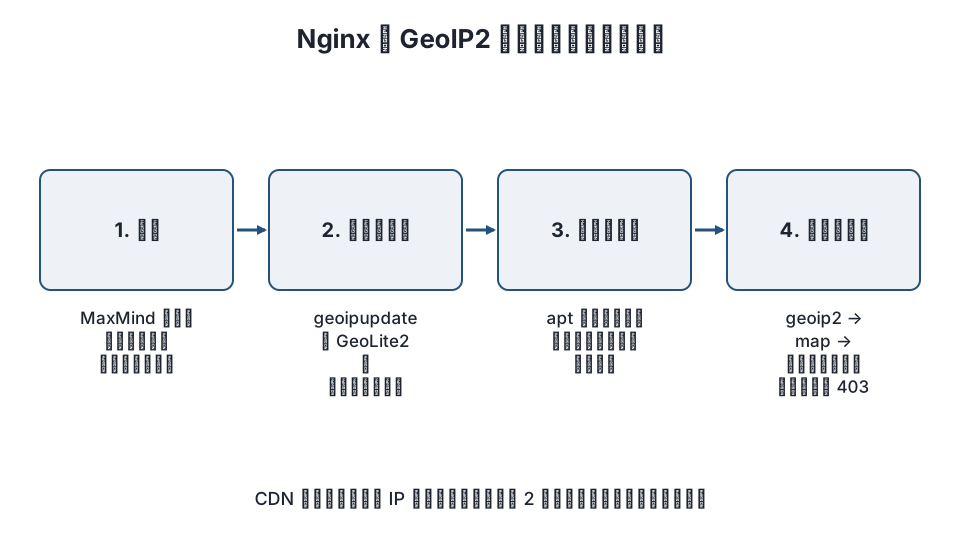
To restrict access by country in Nginx as of November 2026, use the GeoIP2 module (ngx_http_geoip2_module) with MaxMind's GeoLite2 database, put the country code into a variable in a geoip2 block, and decide allow or deny with map. The steps in older articles that "wget the GeoLite .dat file" no longer work, because that data is no longer distributed.
Here is the short version.
- The old
ngx_http_geoip_module(GeoIP Legacy) cannot be used for new setups, because MaxMind has stopped distributing data in the legacy format. Move to GeoIP2 (.mmdbformat). - GeoLite2 is free, but you need a MaxMind account and a license key, and you download and update it with
geoipupdate. - On the Nginx side, create a variable such as
$geoip2_country_codein ageoip2block, usemapto turn it into 0 / 1 (the equivalent ofallow/deny), andreturn 403in alocation. - If the site sits behind a CDN such as Cloudflare, restore the visitor's real IP with
real_ip_headerfirst; otherwise every request is judged as coming from the CDN's country. - Country restrictions are an aid that reduces attacks, and VPNs or relays can get around them. In practice, apply them to the login and admin pages rather than to the whole public site.
Old geoip vs. GeoIP2
| Item | ngx_http_geoip_module (old) | ngx_http_geoip2_module (GeoIP2) |
|---|---|---|
| Data format | GeoIP Legacy (.dat) |
GeoIP2 (.mmdb) |
| Free data | Discontinued (distribution ended in 2019) | GeoLite2 (account registration and license key required) |
| Required library | libGeoIP | libmaxminddb |
| How to get the module | Built into Nginx (--with-http_geoip_module) |
Third-party module leev/ngx_http_geoip2_module. Packaged on Debian / Ubuntu |
| Variables | Fixed, such as $geoip_country_code |
You name them yourself in the geoip2 block |
If your existing configuration uses geoip_country, its database has stopped updating and the lookups are getting stale. Take this opportunity to move to GeoIP2.
Step 1: Register with MaxMind and create a license key
- Create a free account from MaxMind's GeoLite2 page.
- After logging in, issue a License Key from your account page (the key is shown only once, so write it down).
- For the database, use
GeoLite2-Countryif you only need countries, orGeoLite2-Cityif you need cities. Country is enough for country-level restrictions.
The terms of use (GeoLite2 End User License Agreement) include rules on redistributing and displaying the data. Using it only for lookups on your own servers is normally within those terms, but check the conditions when you register.
Step 2: Download and update the database with geoipupdate
GeoLite2 is updated regularly, so use geoipupdate instead of downloading by hand (see the geoipupdate documentation).
# Debian / Ubuntu
sudo apt install geoipupdate

# RHEL family (AlmaLinux / Rocky Linux): from EPEL
sudo dnf install geoipupdate
Put your account ID and license key in the configuration file /etc/GeoIP.conf.
AccountID 123456
LicenseKey your-license-key
EditionIDs GeoLite2-Country
# The save location is the distribution's default (/var/lib/GeoIP on Debian / Ubuntu, often /usr/share/GeoIP elsewhere).
# To change it: DatabaseDirectory /var/lib/GeoIP
sudo geoipupdate -v
ls -l /var/lib/GeoIP/ # success if GeoLite2-Country.mmdb is thereThe packaged geoipupdate comes with a systemd timer or cron job that runs it periodically (check with systemctl list-timers | grep geoip). If there is none, add a cron job that runs about once a week.
Step 3: Install the GeoIP2 module in Nginx
Debian / Ubuntu (Nginx from apt)
sudo apt install libnginx-mod-http-geoip2
ls /etc/nginx/modules-enabled/   # 50-mod-http-geoip2.conf is placed here
nginx -t
Nginx from nginx.org packages or built from source
Install libmaxminddb, then build the dynamic module from the source of the same version as the Nginx you are running.
sudo apt install libmaxminddb-dev   # libmaxminddb-devel on the RHEL family
cd /usr/local/src
git clone https://github.com/leev/ngx_http_geoip2_module
curl -LO https://nginx.org/download/nginx-1.26.3.tar.gz   # match the version to nginx -v
tar xzf nginx-1.26.3.tar.gz && cd nginx-1.26.3
./configure --with-compat --add-dynamic-module=../ngx_http_geoip2_module
make modules
sudo cp objs/ngx_http_geoip2_module.so /etc/nginx/modules/
Load it at the top of nginx.conf (the packaged version does this for you).
load_module modules/ngx_http_geoip2_module.so;Step 4: Put the country code in a variable and decide allow or deny
Write this in the http block. The geoip2 block puts the country code in a variable, and map sets allowed countries to 1 and everything else to 0.
http {
    geoip2 /var/lib/GeoIP/GeoLite2-Country.mmdb {
        auto_reload 60m;
        $geoip2_country_code country iso_code;
    }

    # Countries allowed to reach the admin (ISO 3166-1 two-letter codes)
    map $geoip2_country_code $admin_allowed {
        default 0;
        JP      1;
        ""      1;   # allow when the lookup fails (private IPs, etc.); set to 0 to deny
    }
}
auto_reload is the interval at which Nginx rereads the database after geoipupdate replaces it, without a restart.
Step 5: Restrict only the WordPress login and admin pages
This example leaves public pages alone and restricts only wp-login.php and /wp-admin/ by country. Write it in the server block.
server {
    # ... existing settings ...

    location = /wp-login.php {
        if ($admin_allowed = 0) { return 403; }
        include        fastcgi_params;
        fastcgi_param  SCRIPT_FILENAME $document_root$fastcgi_script_name;
        fastcgi_pass   unix:/run/php/php8.3-fpm.sock;
    }

    location ^~ /wp-admin/ {
        if ($admin_allowed = 0) { return 403; }
        # If plugins call admin-ajax.php from outside, allow it in a separate location
        location ~ \.php$ {
            include        fastcgi_params;
            fastcgi_param  SCRIPT_FILENAME $document_root$fastcgi_script_name;
            fastcgi_pass   unix:/run/php/php8.3-fpm.sock;
        }
    }
}
Combining if with return is a form Nginx handles safely. Public-facing features (forms, infinite scroll and so on) may call /wp-admin/admin-ajax.php for visitors who are not logged in, so decide whether to exclude it from the restriction based on what your site does.
Apply and verify:
sudo nginx -t && sudo systemctl reload nginx

# From your own country: returns 200 or 302
curl -sI https://example.com/wp-login.php | head -1
# Checking the lookup (example that logs the country code)
# log_format geo '$remote_addr $geoip2_country_code "$request" $status';
To see how it looks from abroad, access wp-login.php through a VPN endpoint in another country or from an overseas monitoring service and confirm you get a 403.
Behind a CDN (Cloudflare and others)
Behind a CDN, $remote_addr becomes the CDN's IP, and everyone is judged as being in the CDN's country. Restore the visitor's real IP first with ngx_http_realip_module (see the realip module).
# Cloudflare example. Keep the IP list updated from Cloudflare's official IP Ranges
set_real_ip_from 173.245.48.0/20;
# ... list all Cloudflare ranges ...
real_ip_header   CF-Connecting-IP;
geoip2 looks at $remote_addr by default, so the lookup uses the real IP after realip has replaced it. Cloudflare itself also offers country-based access control (WAF custom rules), so if you use Cloudflare, restricting there is simpler than doing it in Nginx. See also setting up Cloudflare for WordPress.
Limits of country restrictions
- GeoIP lookups are estimates based on IP address registration data, and VPNs, proxies and relays through overseas cloud servers can get around them.
- Mobile networks and corporate networks can be placed in a country different from their real location. There is also the operational problem of locking out administrators who are traveling abroad.
- So use country restrictions as an aid that reduces brute-force login attempts, combined with two-factor authentication, login attempt limits and protecting wp-admin with Basic authentication.
FAQ
What is the difference between Nginx’s geoip module and the geoip2 module?
The old geoip module reads data in the GeoIP Legacy format (.dat), which MaxMind no longer distributes. The geoip2 module (ngx_http_geoip2_module) reads the current .mmdb format and can use the free GeoLite2 data. Use geoip2 for new setups.
Is GeoLite2 free? Do I need to register?
It is free, but you need a MaxMind account and a license key. Download and update it with geoipupdate. The old steps that download it directly without a key no longer work.
Will country restrictions stop unauthorized WordPress logins?
They reduce brute-force attempts, but VPNs and relays through overseas servers can get around them, so they cannot be said to stop them. Combine them with login attempt limits, two-factor authentication, Basic authentication and similar measures.
With Cloudflare, every visitor shows up as the same country
That happens because behind a CDN the connecting address is the CDN's IP. Restore the real IP with set_real_ip_from and real_ip_header CF-Connecting-IP before the lookup. You can also restrict by country with Cloudflare's WAF.
Can I restrict down to the city with GeoLite2-City?
You can put city and region codes in variables too, but city-level accuracy is lower than country-level, and misidentification makes it easier to lock out legitimate users. For access control, staying at the country level is the safer choice.
Summary
- Country restrictions in current Nginx use GeoIP2 (ngx_http_geoip2_module + GeoLite2
.mmdb), and the data is updated withgeoipupdate. - Put the country code in a variable with
geoip2, decide allow or deny withmap, andreturn 403in thelocationblocks forwp-login.phpand/wp-admin/. - Behind a CDN, restore the real IP first, and use country restrictions as a supplementary measure combined with two-factor authentication and the like.
Related articles
- How to restrict access to the WordPress REST API
- How to create an Apache Basic authentication password with htpasswd | Protecting wp-admin
- The complete guide to setting up Cloudflare for WordPress
References: ngx_http_geoip2_module (GitHub), MaxMind GeoLite2 Free Geolocation Data, MaxMind – Updating Databases (geoipupdate), Nginx ngx_http_realip_module
Revision history: 2026-11-09 full revision (replaced the discontinued legacy GeoLite steps with GeoIP2 and geoipupdate, and added the WordPress admin restriction example and the CDN notes). This article is published by WordPress Hakase (Lightscend Inc.).
Questions about WordPress? The publisher of this site is based in Japan and replies in Japanese. Contact (Japanese)